Photo library permission handling
(This affects both "Snap it" and profile picture setup)
In both places where the app needs photo access (scanning a bill/receipt via Snap it, and setting a profile picture) the flow shows an alert saying "Photo library permission is required to select photos" with just an OK button. It never actually triggers iOS's native permission prompt, so there's no way to grant access from either screen. It's a dead end in both cases. To grant these access is painful.
Suggestion: build a single, reusable permission flow and use it everywhere the app needs photo access, rather than handling it separately per feature:
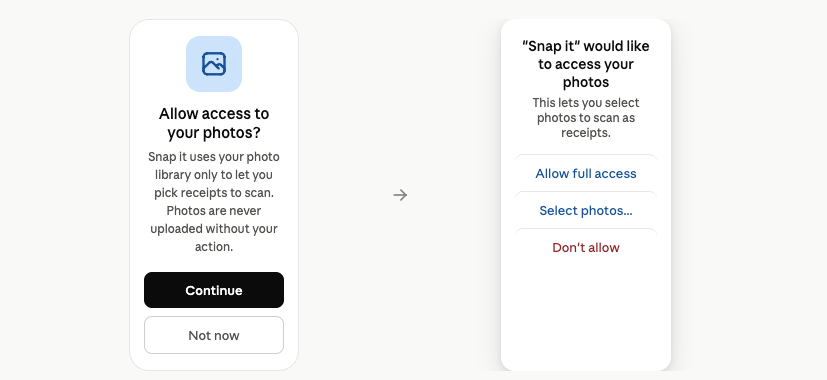
A short in-app "priming" screen that explains, in plain language, why access is needed for that specific context, with a "Continue" button.
Only after the user taps Continue, trigger the real iOS system permission dialog ("BanaSplit would like to access your photos") with the standard Allow Full Access / Select Photos / Don't Allow options.
If permission was previously denied, detect that and deep-link to Settings instead of re-showing a prompt that won't work — iOS won't re-trigger the system dialog once it's been dismissed once.
This would simplify the use of these photo required features.
Log in to comment and vote
Comments2
diogo
Aug 23
This should be fixed on our next release (next week), if you still find it inconsistent, please let us know!
diogo
Jul 30
It’s a mess. Will fix it soon. Thanks you so much Jorge!